
To allow you to access your SecureSafe account even if you have forgotten your username and/or password, you receive your own personal recovery code upon creation of an account. Your SecureSafe recovery code is a unique 36-digit code that allows you to regain access to your account. You can view, create, and download the recovery code from your SecureSafe Settings.
We strongly recommend downloading your recovery code and printing a physical copy to store in a secure location. This ensures you retain access even if your device's locally stored files are lost or unavailable. As part of our security measures, SecureSafe has no access to your password or recovery code at any stage. We cannot reset your account if you lose access to it. Please note that without the recovery code or a valid username-password combination, your data will be irretrievably lost. Additionally, please be aware that creating a new recovery code will immediately invalidate your previous code.
How to Obtain Your Recovery Code
Follow these steps to obtain the recovery code for your SecureSafe account:
- On the menu bar at the top of the SecureSafe web application, click the dropdown icon beside your account user name.
- From the drop-down menu displayed, click Settings to display the SecureSafe settings window.
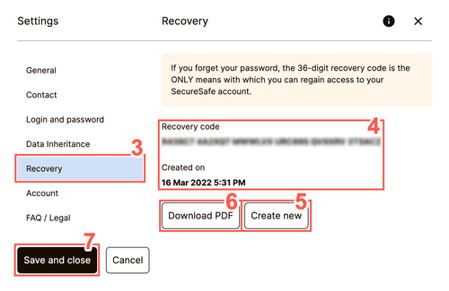
- From the tabs displayed on the left of the Settings window, select Recovery.
-
Review your current Recovery code and the creation date in the Created on field.
-
Optionally, you can choose to create a new recovery code by clicking Create new.
-
To download your recovery code in PDF format, click Download PDF. Once downloaded, this PDF can be saved somewhere secure or printed for safekeeping.
-
Click Save and close to save progress and exit the window.
If you ever lose access to your account, you can use your recovery code to regain access. Please refer to our article on Recovering Your SecureSafe Account for detailed instructions.