
To delete a SecureSend link, follow these steps in the web application:
-
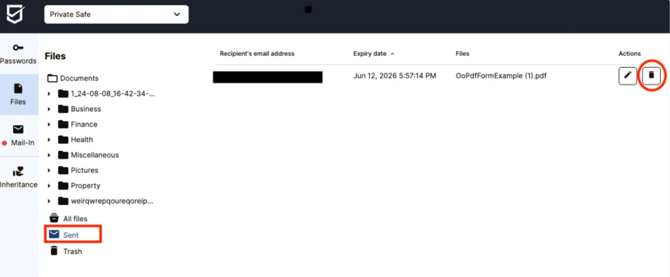
Go to the Files List and open the Sent folder, where all your active SecureSend links are listed. If you do not see the Sent folder, ensure you have previously sent at least one SecureSend link.
-
Find the link you want to delete and click the trash icon next to it.
-
The link is deleted immediately and is no longer accessible to anyone it was shared with.
Note: Deleting a SecureSend link is permanent and cannot be undone. If you need to share the file again afterward, you'll need to create a new SecureSend link. Recipients will lose access immediately upon deletion.