
Overview
In the article How to create & manage SecureSafe Exchanges the process to set up a SecureSafe Exchange has been explained. This article will focus on how to inform a client about the a SecureSafe Exchange .
Inform a Client about a SecureSafe Exchange
Once a SecureSafe Exchange has been created there are two options to inform the client about it.
From Dashboard:
- Click the share icon on the exchange row -> a context menu appears with two options: Send via email or Copy link
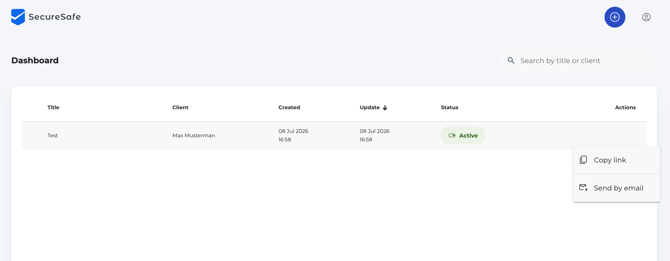
- Select the preferred option
- E-mail link send via the SecureSafe Exchange platform
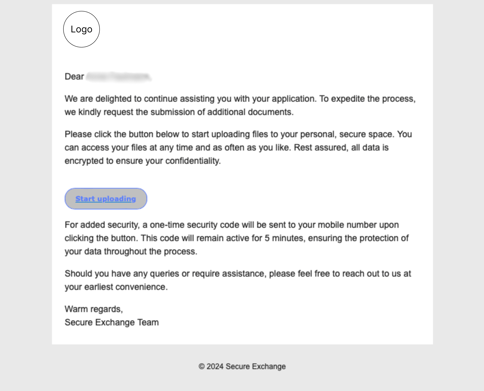
- Click on the button Send by email and an automated E-mail is send to the client with further instructions.
- E-mail link send via the SecureSafe Exchange platform
-
- Copy link from the SecureSafe Exchange platform and shared with client individually.
From Detail view:
- Open the exchange
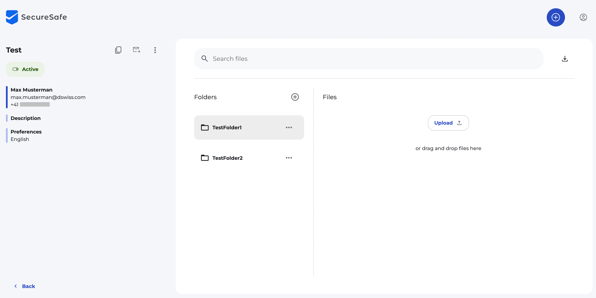
- Two separate buttons are visible in the sidebar next to the name of the Exchange
- Email Link (sends email) and
- Copy Link (copies to clipboard)
- Select the preferred option
Know more:
Check out the following article to learn more about the SecureSafe Exchange experience of the client: