
Overview
SecureSafe now supports Microsoft Entra ID, enabling organizations to manage their SecureSafe users directly through their existing Entra ID tenant. This integration brings enterprise-grade identity management to SecureSafe by combining Single Sign-On (SSO) and SCIM-based user provisioning in one seamless setup.
Whether you are an IT administrator looking to centralize user access or a plan owner wanting to simplify how your team logs in, this integration reduces manual effort and improves security across your organization.
What is Microsoft Entra ID Support?
Microsoft Entra ID is Microsoft's cloud-based identity and access management service. The SecureSafe integration with Entra ID allows your organization to:
-
Sign in to SecureSafe via Single Sign-On (SSO), eliminating the need for separate usernames and passwords
-
Automatically provision and deprovision users in SecureSafe directly from Entra ID
Together, these two capabilities mean your IT team has full control over who has access to SecureSafe, all from within the tools they already use.
Prerequisites
Before setting up the integration, make sure you have the following:
-
An active SecureSafe subscription with a registered plan owner
-
An active Microsoft Entra ID tenant with administrative permissions
-
Access to the Entra ID portal
-
The following values provided by the SecureSafe team:
-
<SCIM_URL>— URL to the SCIM endpoints -
<SAML_URL>— URL for SAML-based SSO login -
<BEARER_TOKEN>— used to authenticate Entra ID calls -
<TENANT_ID>— maps to the Tenant Name on the SecureSafe side
-
-
The following Entra ID user properties must be available in your tenant:
givenName,familyName,email
For step-by-step setup instructions, refer to the EntraID - Tenant Configuration Guide - OID for cross-platform support or the EntraID - Tenant Configuration Guide - SAML for web support.
How It Works
The integration consists of two components that work together:
-
Single Sign-On (SSO) via OIDC or SAML - Once configured, users can log in to SecureSafe using their existing Microsoft credentials. Instead of managing a separate password, users are authenticated through Entra ID and automatically granted access to SecureSafe based on their assigned role.
-
User Provisioning via SCIM - SCIM provisioning allows your IT team to manage SecureSafe users directly within Entra ID. When a user is assigned to the SecureSafe application in Entra ID, they are automatically provisioned in SecureSafe. When they are removed or deactivated in Entra ID, their SecureSafe access is revoked - no manual steps required.
Supported user types:
-
Plan Owner - the user who purchased the SecureSafe plan
-
Plan Users - members of the plan managed by the plan owner
Logging into SecureSafe with Microsoft Entra ID
Once the integration has been configured by your IT administrator, users can log in to SecureSafe via Microsoft Single Sign-On (SSO).
For plan users:
-
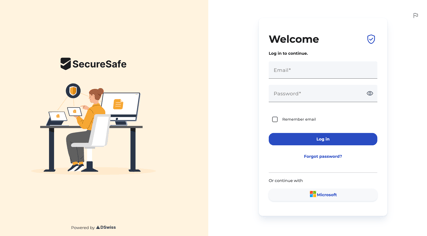
Go to the SecureSafe login page
-
Click on Microsoft
-
If you are not already signed in to Microsoft, you will be redirected to the Microsoft authentication page - enter your Microsoft credentials
-
If your organization has MFA enabled, complete the authentication prompt
-
You will be redirected back to SecureSafe and logged in automatically
Note: If you had a SecureSafe account prior to the Entra ID integration being set up, you can also log in using your existing username and password.
For the plan owner:
The plan owner can log in using either:
-
The Microsoft button, in the same way as plan users, or
-
Their existing SecureSafe username and password, which remains available as a fallback
Typical Use Cases
-
Centralized user management:
-
Organizations that manage a large number of users can add or remove SecureSafe access directly from Entra ID, without needing to log in to SecureSafe separately.
-
-
Seamless employee onboarding and offboarding:
-
When a new employee joins, assigning them to the SecureSafe app in Entra ID automatically creates their account. When they leave, deactivating them in Entra ID immediately revokes their access - reducing security risks.
-
-
Single Sign-On for a better user experience:
-
Employees no longer need to remember a separate SecureSafe password. They log in with their existing Microsoft credentials, making the experience faster and more secure.
-
-
Enforcing company-wide access policies:
-
IT administrators can apply Entra ID conditional access policies - such as multi-factor authentication (MFA) - to SecureSafe access, ensuring consistent security standards across all applications.
-