
SecureSafe supports uploading entire folders in a single action. This capability eliminates the need to select individual files manually and allows users to upload folders, including all nested subfolders and files, at once.
This feature is designed to streamline bulk uploads and improve efficiency when working with structured file collections.
Folder uploads significantly reduce time and operational friction when managing large or hierarchical data sets. This is particularly beneficial for use cases such as:
-
Project documentation with multiple directories
-
Client deliverables organized by phase or category
-
Audit or compliance evidence requiring preserved structure
By maintaining the original folder hierarchy, SecureSafe ensures files remain organized and contextually intact after upload.
How to upload a folder
-
Navigate to the target safe where you want to add content.
-
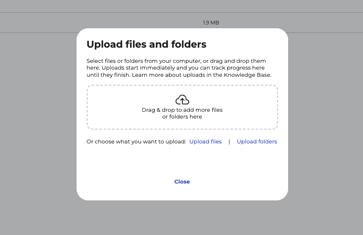
Select Upload Folder, or drag and drop a folder directly into the upload area.
-
Confirm the upload to begin transferring the full folder structure.
Notes
-
Folder uploads preserve the complete directory structure and all included files.
-
Upload performance depends on total folder size and available network bandwidth.
-
Large uploads may take longer to complete and should not be interrupted.