
To manage or cancel your subscription
- Login to your SecureSafe application
- Go to the Profile Icon in the upper right corner and click on Plan
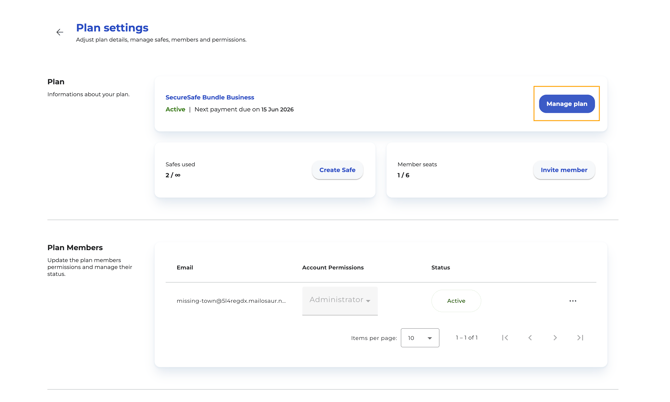
- By clicking the button Manage plan you are directed to the Manage Subscripton page
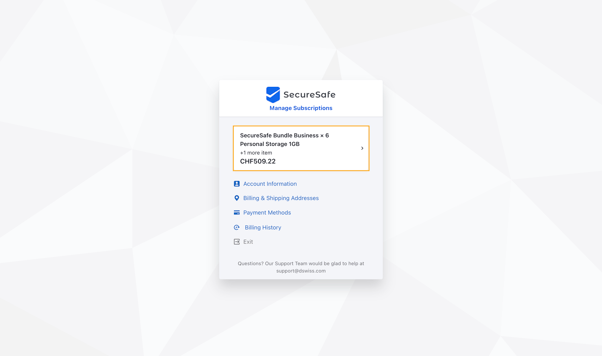
-
- view Subscription Details
- Click on Cancel Subscription
- view Subscription Details
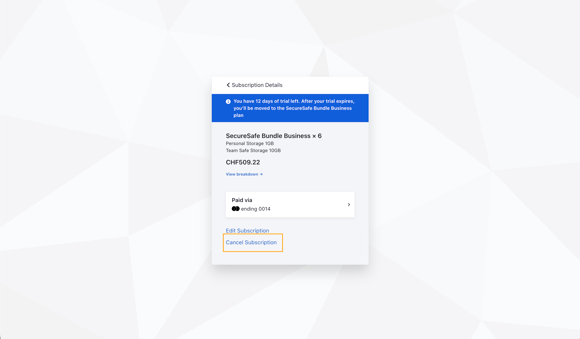
-
-
When you initiate a cancellation, we ask you to select or provide a cancellation reason. This input helps us improve the service and user experience, but does not affect the cancellation outcome.
-
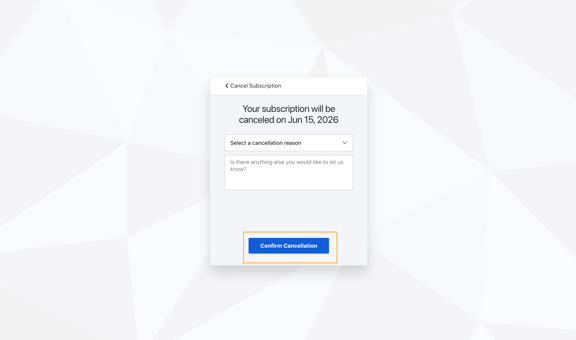
-
- Confirm your cancellation by clicking Confirm Cancellation
Cancellation Rules and Billing Behavior
During the Trial Period
- You may cancel at any point, but the cancellation is effective at the end of the 14 day trial period.
-
No charges apply, and your access will stop once the cancellation is submitted.
After the Trial Period (Active Paid Term)
-
You may cancel at any point, but the cancellation is effective at the end of your current billing term.
-
The system will not issue refunds or prorated credits for unused time within the active term.
-
Your subscription will not renew for the next billing cycle.
This ensures you retain access for the remainder of the period you have already paid for, while preventing future renewals.
Reversing a Scheduled Cancellation
If you previously submitted a cancellation but change your mind before the current term expires, you can reinstate your subscription. Your subscription will continue uninterrupted into the next billing cycle.