
At times, when performing a sync, you can be faced with issues or documents/folders that might not have synced. You will be informed of this by the Desktop App, on the Activity.
Upon a sync, you might get an error message that an issue occurred:
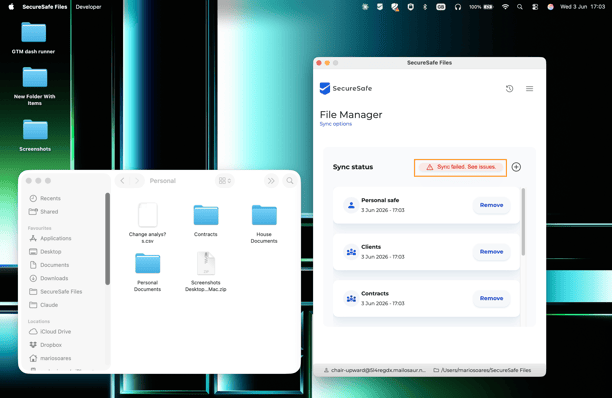
To go to the Activity window, that informs you of all the files that have been synced, you can click on the “Sync failed. See issues” error message, or click on the Activity button or the activity option on the tray menu:
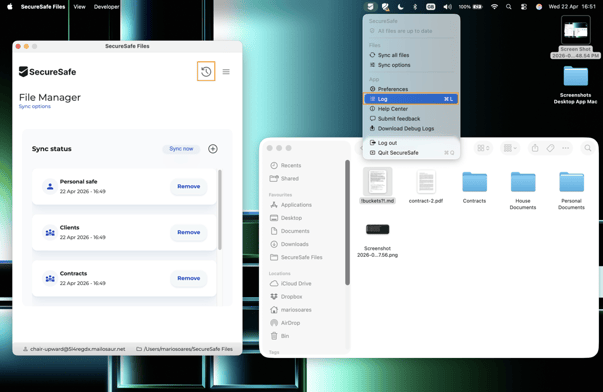
A new window will open, where you will see the details for what went wrong:
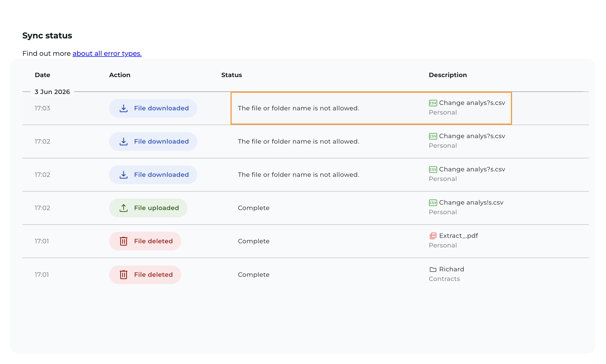
The file or folder with the issue will have a red status, with the information of what the problem is. You can also see, by this order, the date and hour of the sync, the action trying to be performed, the status, and finally the File Name and the Safe associated, so you can locate it.
Let’s see what types of errors can happen and how to solve them.
| Error | Solving |
| The file or folder name is not allowed. |
Your folder of files contains invalid characters. SecureSafe does not allow uploads or downloads of files with the following characters:
|
| The file is empty and will not be synchronized. | Check your file and see if it is not corrupted or with any issue. The file is empty and cannot be uploaded. |
| The file is too big to synchronize. | The unique file exceeds 2GB, and cannot be uploaded. You can try to compress the item and try again. |
| The file or folder name is too long. | Your file/folder name is above 128 characters. That is the maximum allowed. Please rename your item, and try again. |
| A network error has occurred. | There has been an issue in the sync process regarding your connection to the internet. Please retry when you have a connection. |
| This operation is not allowed. | If you don't have permissions to add or delete on a certain safe. For example, if you’re a viewer of a team safe and you’re trying to delete a file. This operation is not allowed. |
| The folder structure is too deep. | The path created from the root folder until the document is too long. To solve this, reduce the size of the naming of certain files or folders in that path. |
| Storage quota exceeded. | You currently have no free space to add more documents. You can buy more storage. To find out how, follow this article. |
| Failed to download the file. | This is presented in case the error is not known. If this issue persists, please contact Support. |
| An error has occurred. | |
| Failed to upload the file. |